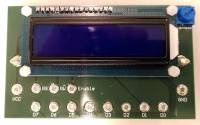
This module provides a two-line LCD display with 16 characters per line.
| Panel | ||||||||||
|---|---|---|---|---|---|---|---|---|---|---|
| ||||||||||
Usage Zynq7000
To use the LCD display with the zynq7000, connect it in the following way:
| Zynq7000 | Display |
|---|---|
| gpio[0] ... gpio [7] | D0 ... D7 |
| gpio[8] | RS |
| gpio[9] | E |
| gpio[10] | R/W |
There are two drivers available. One for Java in combination with deep and one for Python when using a Linux operating system.
Python Example
Java Example
| Codeblock | ||||||||
|---|---|---|---|---|---|---|---|---|
| ||||||||
import driver import time # init LCD disp = driver.HD44780U() disp.init(2) # write to display a = 87103 disp.writeString(str(a)) disp.setCursor(1,5) disp.writeChar('A') disp.writeChar('x') time.sleep(3) # clear display disp.clearDisplay() disp.onOff(True, False, False) |
Java Example